Introduction
The best way to understand something is to implement it yourself. I recently watched someone implement HTTP from scratch in C, and I wanted to see if I could do the same thing in Rust. I managed to get it working (with unsafe, unoptimized code). To understand how to build an HTTP server, we first need to look at the TCP/IP model.
WARNING: This is a hacky implementation. The code is neither safe nor optimized for production. I am also relying on Tokio for the underlying TCP streams rather than writing TCP from scratch.
The TCP/IP Model
So the TCP/IP model, also known as the Internet Protocol Suite, is a conceptual framework for how data is transmitted over a network. It is divided into four layers, each with specific functions. These layers are:
- Application Layer
- Transport Layer
- Internet Layer
- Network Interface Layer
It's look like this:
+--------------------+
| Application Layer  |
|  - HTTP            |
|  - FTP             |
|  - SMTP            |
|  - DNS             |
+--------------------+
| Transport Layer    |
|  - TCP             |
|  - UDP             |
+--------------------+
| Internet Layer     |
|  - IP              |
|  - ICMP            |
|  - ARP             |
+--------------------+
| Network Interface  |
|  - Ethernet        |
|  - Wi-Fi           |
|  - ARP             |
+--------------------+
| Physical Layer     |
|  - Physical Media  |
+--------------------+
Layer Functions:
- Application Layer: It provides network services to the applications of the user. This is where high-level protocols like HTTP, FTP, SMTP, and DNS resides.
- Transport Layer: Ensures reliable data transfer between hosts. It is responsible for error detection and correction, data flow control, and segmentation.
- Internet Layer: Determines the best path through the network for data to travel. It handles packet routing, addressing, and fragmentation.
- Network Interface Layer: Manages the hardware connections and data transfer between adjacent network nodes. It is used for framing, physical addressing, and error detection on the physical link.
What is TCP?
The Transmission Control Protocol (TCP) is a core protocol of the Internet Protocol Suite. It provides reliable, ordered, and error-checked delivery of data between applications running on hosts communicating via an IP network. TCP is connection-oriented, meaning a connection is established and maintained until the applications at each end have finished exchanging messages.
TCP Packet Structure
A TCP packet (or segment) structure is divided into several fields, each serving a specific purpose for establishing and maintaining a reliable connection. Below is a simplified diagram of a TCP packet:

You don't need to understand what all this data is used for to build an HTTP server, but this header is what enables TCP to reliably send data over the network.
What is HTTP?
The Hypertext Transfer Protocol (HTTP) is an application layer protocol used for transmitting hypermedia documents, such as HTML. It's a long story, here are two articles explain how HTTP actually works!
HTTP Request Header Structure
An HTTP request header is the format in which the client sends data to the server. It consists of a request line, header fields, and an optional message body. Here is a simplified diagram:
+-----------------------------------------+
| Request Line                            |
| GET /index.html HTTP/1.1                |
+-----------------------------------------+
| Header Fields                           |
| Host: www.example.com                   |
| User-Agent: Mozilla/5.0                 |
| Accept: text/html                       |
| ...                                     |
+-----------------------------------------+
|                                         |
| Optional Message Body (for POST, etc.)  |
| ...                                     |
+-----------------------------------------+
Components:
- Request Line: Contains the HTTP method, the resource path, and the HTTP version.
- Example:
GET /index.html HTTP/1.1
- Example:
- Header Fields: Key-value pairs providing metadata about the request.
- Host: The domain name of the server.
- User-Agent: Information about the client software.
- Accept: Media types the client is willing to receive.
- Other headers may include
Content-Type,Content-Length,Connection, etc.
- Optional Message Body: Present in requests like POST, PUT, etc., and contains the data to be sent to the server.
In my implementation, I ignore most of the request header, because I don't need most of them in this implementation. Only GET request that are handled in this project for the sake of simplicity, the point is I understand how HTTP works (just an excuse because I'm lazy)
How TCP and HTTP Work Together
When you visit a website, your browser (the client) initiates a TCP connection to the server hosting the website. Once the connection is established, the browser sends an HTTP request over the TCP connection to retrieve the web page. The server processes the request and sends back an HTTP response with the requested resource. This process involves the following steps:
-
TCP Handshake: Establishes a connection between client and server.
Client Server |-------[SYN]-------------------->| |<------[SYN, ACK]----------------| |-------[ACK]-------------------->| -
Sending HTTP Request: Once the TCP connection is established, the client sends an HTTP request.
Client Server |-------[GET /index.html HTTP/1.1\r\n]-->| |-------[Host: www.example.com\r\n]------| |-------[User-Agent: Mozilla/5.0\r\n]----| |-------[\r\n]-------------------------->| -
Server Response: The server processes the request and sends back an HTTP response.
Client Server |<------[HTTP/1.1 200 OK\r\n]-------------| |<------[Content-Type: text/html\r\n]-----| |<------[Content-Length: 137\r\n]---------| |<------[\r\n]----------------------------| |<------[<html>...content...</html>]------| -
TCP Termination: After the data transfer, the TCP connection is closed.
Client                           Server
|-------[FIN]-------------------->|
|<------[FIN, ACK]----------------|
|-------[ACK]-------------------->|
Building the HTTP
Here's the code for this super simple HTTP implementation that I wrote from scratch, I use tokio for the TCP. Because I don't want to write TCP by myself (for now)!
The Code
use tokio::net::{TcpListener, TcpStream};
use tokio::io::{AsyncReadExt, AsyncWriteExt};
use std::path::Path;
use std::fs;
use mime_guess::from_path;
use tokio::sync::RwLock;
use std::sync::Arc;

const HEADER_PACKET_LENGTH: usize = 1024;

type AllowedFileTable = Arc<RwLock<Vec<String>>>;

#[tokio::main]
async fn main() {
    let allowed_file_table = Arc::new(RwLock::new(create_allowed_file_table()));

    // Bind a TCP listener to the specified address and port.
    let listener = TcpListener::bind("127.0.0.1:7878").await.unwrap();
    println!("Server listening on port 7878");

    loop {
        let (socket, _) = listener.accept().await.unwrap();
        let allowed_file_table = Arc::clone(&allowed_file_table);
        tokio::spawn(async move {
            handle_client(socket, allowed_file_table).await;
        });
    }
}

/// Handles the client connection.
///
/// Reads the request from the client, checks if the requested file is allowed,
/// and sends the appropriate response.
///
/// # Arguments
///
/// * `socket` - The TCP stream representing the client connection.
/// * `allowed_file_table` - The allowed file table to check for file access.
async fn handle_client(mut socket: TcpStream, allowed_file_table

: AllowedFileTable) {
    let mut buffer = [0; HEADER_PACKET_LENGTH];
    if let Ok(n) = socket.read(&mut buffer).await {
        if n == 0 {
            return;
        }

        let request = String::from_utf8_lossy(&buffer[..n]);
        let mut lines = request.lines();

        if let Some(first_line) = lines.next() {
            let parts: Vec<&str> = first_line.split_whitespace().collect();
            if parts.len() == 3 && parts[0] == "GET" {
                // Extract the requested path.
                let path = parts[1].trim_start_matches('/');
                // Check if the requested file is allowed.
                let allowed = {
                    let table = allowed_file_table.read().await;
                    table.iter().find(|entry| entry.ends_with(path)).cloned()
                };

                if let Some(full_path) = allowed {
                    // Send the content if the file is allowed.
                    send_content(&full_path, &mut socket).await;
                } else {
                    // Send a 403 Forbidden response if the file is not allowed.
                    send_forbidden_packet(&mut socket).await;
                }
            } else {
                // Send a 400 Bad Request response if the request is not a valid GET request.
                send_bad_request_packet(&mut socket).await;
            }
        }
    }
}

/// Sends a 403 Forbidden response to the client.
///
/// # Arguments
///
/// * `socket` - The TCP stream representing the client connection.
async fn send_forbidden_packet(socket: &mut TcpStream) {
    let data = "HTTP/1.1 403 Forbidden\r\nContent-Type: text/html\r\nContent-Length: 0\r\n\r\n";
    println!("Forbidden request received");
    socket.write_all(data.as_bytes()).await.unwrap();
}

/// Sends a 400 Bad Request response to the client.
///
/// # Arguments
///
/// * `socket` - The TCP stream representing the client connection.
async fn send_bad_request_packet(socket: &mut TcpStream) {
    let data = "HTTP/1.1 400 Bad Request\r\nContent-Type: text/html\r\nContent-Length: 0\r\n\r\n";
    println!("Bad request received");
    socket.write_all(data.as_bytes()).await.unwrap();
}

/// Sends the content of the requested file to the client.
///
/// Reads the file, determines its MIME type, and sends it along with the HTTP response headers.
///
/// # Arguments
///
/// * `path` - The path of the file to send.
/// * `socket` - The TCP stream representing the client connection.
async fn send_content(path: &str, socket: &mut TcpStream) {
    if let Ok(content) = fs::read(path) {
        // Determine the MIME type based on the file extension.
        let content_type = from_path(path).first_or_octet_stream();
        let response = format!(
            "HTTP/1.1 200 OK\r\nContent-Type: {}\r\nContent-Length: {}\r\nAccess-Control-Allow-Origin: *\r\n\r\n",
            content_type, content.len()
        );
        socket.write_all(response.as_bytes()).await.unwrap();
        socket.write_all(&content).await.unwrap();
    } else {
        // Send a 403 Forbidden response if the file could not be read.
        send_forbidden_packet(socket).await;
    }
}

/// Creates and initializes the allowed file table.
///
/// Scans the predefined list of file paths and adds existing files to the allowed file table.
///
/// # Returns
///
/// A vector of strings representing the allowed file paths.
fn create_allowed_file_table() -> Vec<String> {
    let paths = vec!["./public/index.html", "./public/style.css"];
    let mut table = Vec::new();
    for path in paths {
        if Path::new(path).exists() {
            table.push(path.to_string());
        }
    }
    table
}
How It Works
-
Initialization: The main function initializes the allowed file table and starts the TCP listener on port 7878.
-
Accepting Connections: The server listens for incoming connections in an infinite loop. For each new connection, it spawns a new task to handle the client.
-
Handling Requests: The
handle_clientfunction reads the request from the client. It checks if the request is a valid HTTP GET request and whether the requested file is allowed. If the file is allowed, it serves the content; otherwise, it sends a 403 Forbidden response. -
Sending Responses: There are helper functions to send different types of responses (
send_forbidden_packet,send_bad_request_packet, andsend_content). Thesend_contentfunction reads the requested file, determines its MIME type, and sends the file content along with appropriate HTTP headers.
Limitations
This implementation is intentionally naive. It cannot handle concurrent connections efficiently, it lacks SSL/TLS encryption, and it does not support load balancing or session management. Functionally, it only supports basic GET requests for static files.
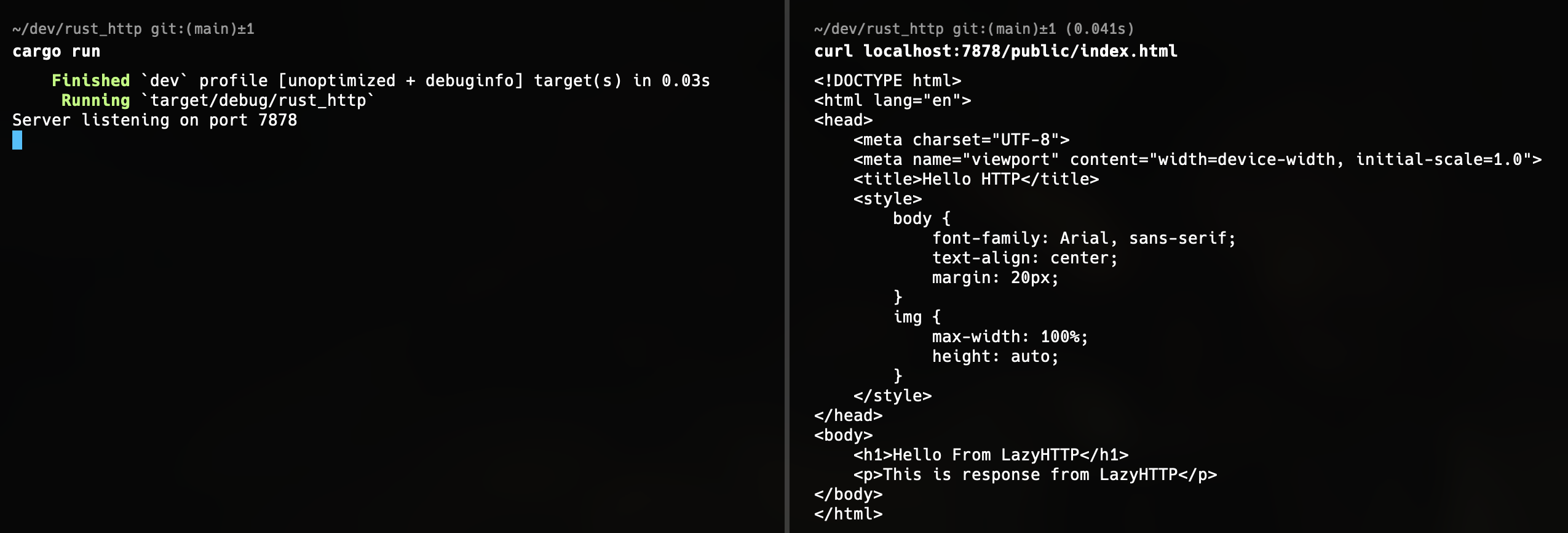
Here's the result
What Next
If you read through this and felt lost, that is completely normal. I still do not fully understand the lower-level mechanics of TCP streams myself. Building things just past the edge of your understanding is a great way to learn. Next, I plan to try writing WebSockets from scratch.
The full source code for this project is available on GitHub.