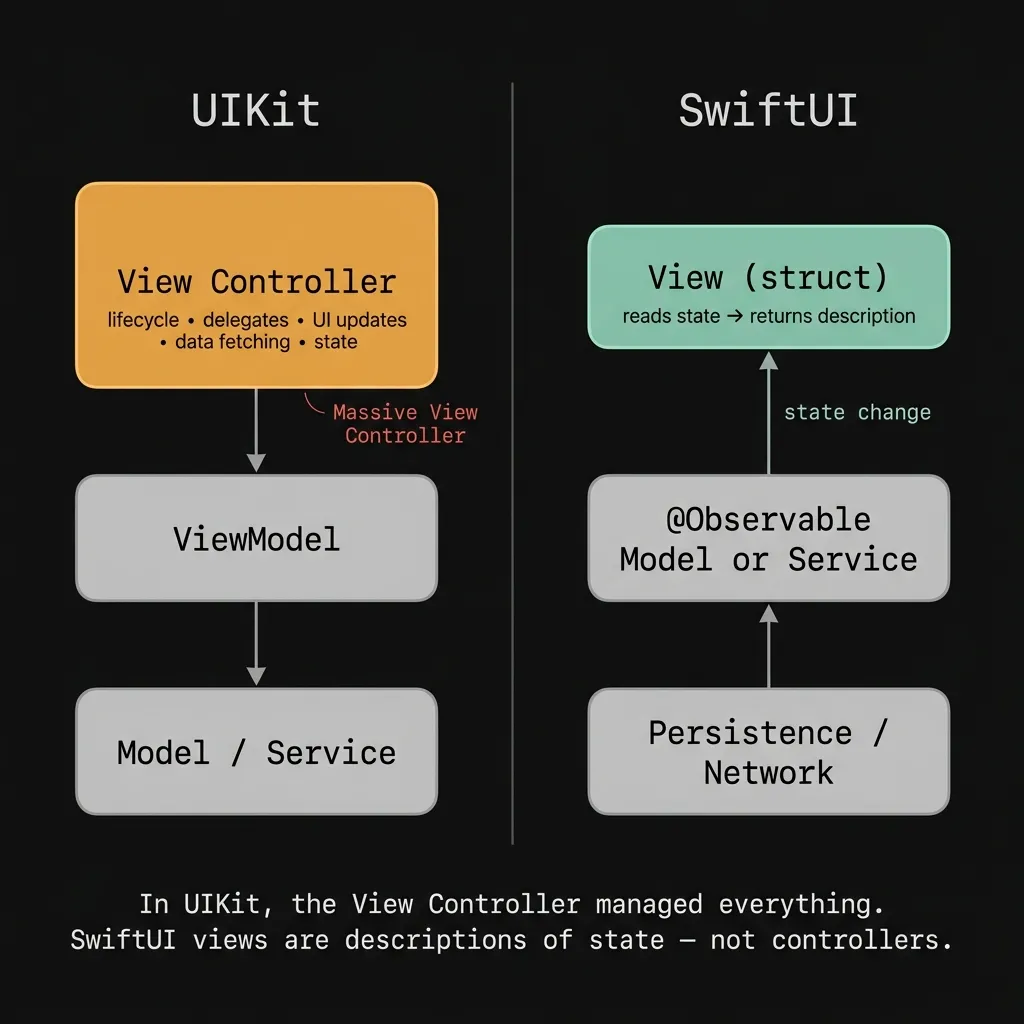
MVVM arrived in iOS from a different world. It was designed for UIKit, back when view controllers were the chaotic middleman between user taps and underlying state. Everyone remembers the Massive View Controller era, where classes were juggling table views, network requests, session state, and form validation all at once. MVVM offered a clean escape hatch. You pull the business logic out, park it in a ViewModel, and have the view simply react to changes.
That made sense for UIKit. But when SwiftUI shipped in 2019, most of us just carried MVVM over out of habit, without asking if the massive view controller problem even existed anymore.
The framework shift
SwiftUI views are just structs. They don't have a real lifecycle, delegate chains, or mutation methods. You give SwiftUI some state, and the view describes what it should look like. When that state changes, SwiftUI figures out the difference and repaints everything for you. The view doesn't mutate itself at all.
Because of this, the traditional role of a ViewModel vanishes. In UIKit, a ViewModel decoupled your logic from a view controller that had too many jobs. It solved a real problem. In SwiftUI, the view is already decoupled. It reads state, it renders, and then it stops. That's its entire job.
When you shoehorn a ViewModel into a SwiftUI view, you're building a layer that the framework doesn't expect. So you have to ask: what is that layer actually doing for you?
Where MVVM becomes a liability
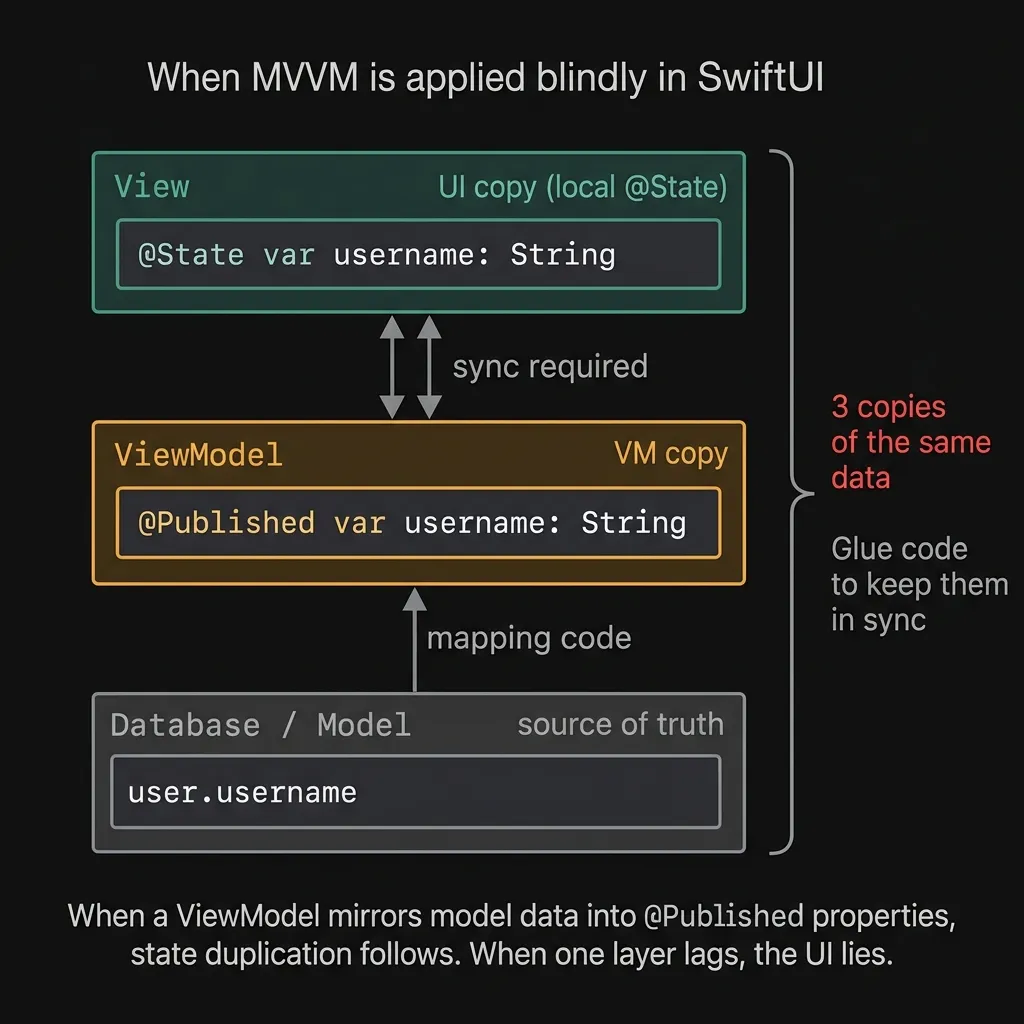
The most obvious trap is state duplication. Let's say your model lives in a database or service. You mirror some of its fields into your ViewModel's published properties, and the view reads from those properties. Now you have three floating copies of the same data. The moment the underlying data updates, you have to run glue code to catch your ViewModel up. If that glue code fails or runs late, the user looks at a stale UI. It's a nightmare to debug because it only happens during specific sequences of state changes.
Then there's the dumping ground problem. Developers often take every concern they want out of the view (network calls, formatting, navigation routing, form validation) and stuff it into a single ObservableObject. Six months later, it's a thousand-line monolith. You haven't solved the Massive View Controller problem. You just renamed it to Massive View Model.
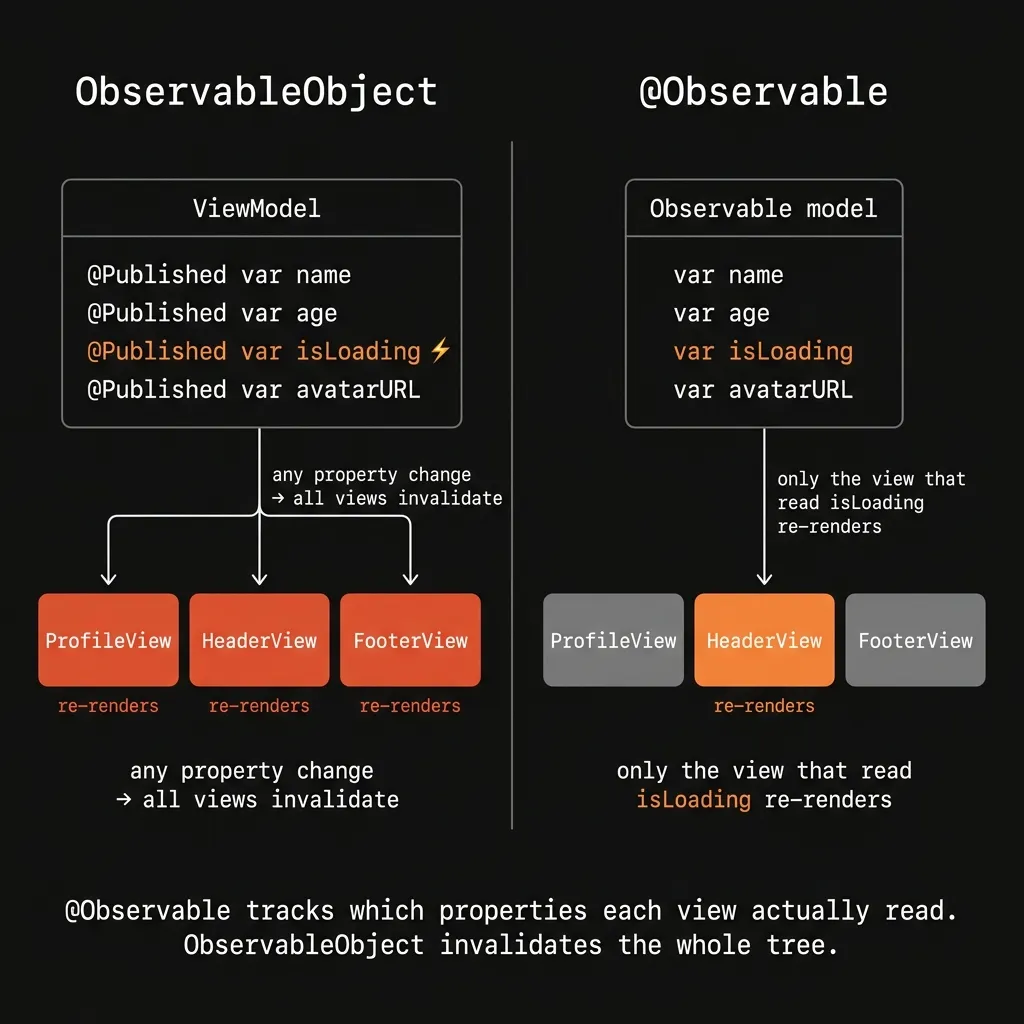
And then there's performance. Under Combine based observation, an ObservableObject invalidates the entire view the moment any @Published property ticks. If your ViewModel has ten properties and your view only reads two, updating the other eight still triggers a completely wasted rerender. If you have nested subviews observing that same object, the whole tree thrashes. People try to fix this by hacking the ViewModel apart into smaller pieces, which pretty much destroys the reason for having a unified ViewModel to begin with.
@Observable didn't solve the architecture
When iOS 17 introduced the @Observable macro, the mechanics of state management got a lot cleaner. It ditches Combine for property observation at the Swift runtime level. A view hooked to an @Observable object actually tracks which specific properties it touched during the last render pass, and only rerenders when those specific properties flip. The massive invalidation issue completely disappears.
The syntax is also much better. You get to drop @Published, @StateObject, and @ObservedObject. An @Observable class plugs right into @State and @Environment. Most of the friction that made MVVM annoying to write is gone.
But @Observable doesn't answer the architectural question. It makes writing an observable class easier, sure. But it doesn't tell you if you actually need a dedicated class for your view. Does sticking an intermediate object between your view and your data give you leverage, or does it just add indirection? That structural question is exactly where it was in iOS 13.
When a ViewModel still makes sense
Sometimes a ViewModel is exactly what you need. I usually reach for one if a screen has heavy local state, needs isolated unit tests for its logic, and has to talk to multiple external services simultaneously.
Take a checkout flow. It sits on form inputs, runs business validation rules, hits a payment gateway, checks inventory, juggles errors from both, updates the UI based on the outcome, and maybe updates a user session at the end. You shouldn't have to spin up a SwiftUI view just to test if a declined card shows the right error formatting. Pushing that logic into an @Observable class, injecting the services via its initializer, and hitting it with unit tests is exactly how you should build it.
Large teams also have plain logistical reasons to keep ViewModels. If you have a designer tweaking the view and an engineer writing the business logic, putting them in the same file is just asking for merge conflicts. A ViewModel acts as the boundary between them.
And if you're incrementally migrating a UIKit app, ViewModels make a great temporary bridge. Your existing tests still pass, the developers know the pattern, and your new SwiftUI view stays thin. It might not be the final architecture you want, but it keeps the app compiling today.
Where it's just overhead
If you have a settings screen that just reads a few user defaults and flips them on a toggle, you don't need a ViewModel. The view can just own a few @AppStorage properties directly. Injecting a ViewModel into that flow forces an extra file, an extra allocation, and a layer of indirection that gives you absolutely zero architectural leverage.
A read only profile screen that fetches a user and renders them also doesn't need one, provided your data model is already @Observable. Stick the service in the @Environment, run the fetch on appear, stash the result in @State, and draw the screen. The data model already handles the observation part. You don't need a middleman.
Static detail screens displaying cached objects have no real state to manage. If you build a ViewModel for a static view, you're doing it because someone wrote a project convention that says "every screen gets a ViewModel," not because the screen actually demands one.
The absolute worst offender is the pass through ViewModel. If your ViewModel has a username property that just returns user.username, you haven't separated any concerns. You've just created an extra layer of typing.
We're not arguing about the same thing
If you watch developers argue about MVVM on Twitter, they usually talk right past each other because they're looking at completely different problems. The defenders are usually picturing checkout flows, large enterprise apps, strict test coverage rules, and tangled business logic. The critics are picturing simple screens stuffed with boilerplate, state duplication bugs, and the massive rerendering penalties of Combine.
Both sides are completely right about the version of MVVM they're looking at.
Most of the pain comes from applying the pattern uniformly. If you mandate a ViewModel for every single view, you drown in boilerplate and synchronization bugs. The people who actually like MVVM tend to use it selectively: bringing it in for heavy features and leaving it out of simple ones.
Apple's recent sample code and WWDC sessions push @Observable models much closer to the data layer, moving away from per view ViewModel classes. Look at the 2023 Observation sessions. They use @Observable classes as domain stores injected via @Environment, not as dedicated controllers hooked to specific views. They aren't telling you to stop using ViewModels. They're telling you to stop paying a ViewModel tax on every screen you build.
How to decide
Instead of asking "Should I use MVVM?" I try to ask a few specific questions about the screen I'm building:
- Does this view coordinate multiple async tasks, juggle complex error states, or rely on several services? A dedicated
@Observableclass is the right tool. Put the heavy logic there, inject what you need, and test it in isolation. - Does this view just present an
@Observabledata model with a few light tweaks? Just read the model directly via@Stateor@Environment. The model handles the observation, and a wrapper object will only slow you down. - Is the state strictly local like a text field, a loading spinner, or a selected tab? Keep it in
@State. The state belongs to the view, so let it live there. - Is the view file getting so long that it's unmanageable? Before you reach for a ViewModel, try extracting subviews. Breaking a massive view apart into smaller child views with their own local state usually solves the bloat without needing an entirely new class.
MVVM isn't fundamentally broken. It has a decades long track record and it saved UIKit apps from total collapse. The only mistake is treating it as a default instead of a specialized tool for a specific problem.
SwiftUI completely changed the job description of a view. It no longer manages its own lifecycle, it doesn't push updates to the screen, and it doesn't manually mutate elements. That narrowed scope means the crippling problems MVVM solved in UIKit are usually much smaller in SwiftUI and sometimes they aren't there at all.
When your business logic is genuinely complicated and needs strict test coverage, an @Observable ViewModel is a great architectural choice. When the logic is sparse or missing entirely, the ViewModel is pure overhead. The question has always been whether the abstraction earns its keep. In UIKit, the answer was almost always yes. In SwiftUI, it depends on the screen.